-->

We are support for all mobile flashing Box And Dongle Software


Showing posts with label solution. Show all posts

Mar 23, 2018

[Tutorial] Vivo y11 Flashing Done With Miracle Box

Vivo y11 Flashing Done With Miracle Box full Tutorial

Vivo Y11 successfully flashed with Miracle Box, Here we have uploaded proof of this solution, you can easily flash your Vivo y11 after reading this post. Step by Step user guide for how to flash Vivo Y11 with Miracle box.
If you are using an older version of Miracle Box then, first you have to download the latest version from the link given below.
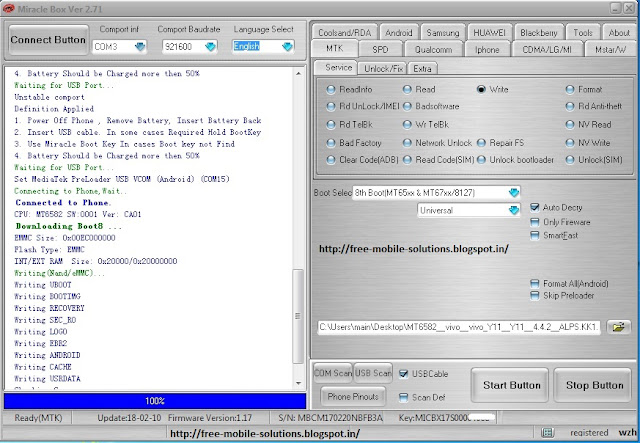
Vivo y11 Flashing Done Miracle box

Miracle box latest version Download 

How to flash Vivo Y11 with Miracle Box

  1. Power Off Phone, Remove Battery, Insert Battery Back
  2. Insert USB cable. In some cases Required Hold BootKey
  3. Use Miracle Boot Key In cases Boot key not Find
Note :-  Battery Should be Charged more then 50%

Information

  System Info:
  id:ALPS.KK1.MP1.V2.46
  version:4.4.2
  model:vivo Y11
  brand:vivo
  manufacturer:vivo
  Waiting for USB Port...
  Unstable comport
  Definition Applied
  1. Power Off Phone , Remove Battery, Insert Battery Back
  2. Insert USB cable. In some cases Required Hold BootKey
  3. Use Miracle Boot Key In cases Boot key not Find
  4. Battery Should be Charged more then 50%
  Waiting for USB Port...
  Set MediaTek PreLoader USB VCOM (Android) (COM15)
  Connecting to Phone,Wait..
  Connected to Phone.
  CPU: MT6582 SW:0001 Ver: CA01
  Downloading Boot8 ...
  EMMC Size: 0x00EC000000
  Flash Type: EMMC
  INT/EXT RAM  Size: 0x20000/0x20000000
  Writing(Nand/eMMC)...
  Writing UBOOT
  Writing BOOTIMG
  Writing RECOVERY
  Writing SEC_RO
  Writing LOGO
  Writing EBR2
  Writing ANDROID
  Writing CACHE
  Writing USRDATA
  Checking Sum...
  Write Done.
>>Total time: 4 mins 16 s

Mar 22, 2018

Samsung B313E Hang on Logo format Done With cm2 SPD Module

Samsung B313E Hang on Logo Done With cm2 SPD Module successfully

Samsung B313E Hang on Logo Solution With cm2 SPD Module, Here is the full step by step solution procedure for how to format Samsung B313E which is hanged on the logo by cm2 Dongle SPD Module.
Samsung B313E Hang on Logo

How to Format Samsung B313E Hanged on Logo [solved]

Connect cm2 Dongle and Run SPD Module.
Set mode to SPD6530_SAMSUNG
Operation : Format File System / Reset Settings [ v1.27 ]
Settings : SmartFormat is On
  1. Remove battery. Insert USB cable
  2. Press and hold BootKey ( Skip, if use BootCable )
  3. Insert battery

 Information

Port Opened
Sync...
InitBoot Done [ 0x81 ] , Ver : SPRD3
Sync...
Sending boot ... 
Boot Sent , starting...
Boot Ver : Spreadtrum Boot Block version 1.2
Boot Ok
CPU ID : 6530 , FDLStat : 0000
[0] Flash DIE : 00C8 0060 0019 0000
[0] Flash VEN : GigaDevice , GD25LQ256
[0] Flash CAP : 02000000
Verify data... Can take some time
Init Ok, formatting DIN area ... 
Format Block Done!
Done!

Elapsed: 00:02:25

Reconnect Power/Cable!

Mar 17, 2018

Mi 4i Reset Mi Account Done with ultimate Multi Tool [Tested]

Mi 4i Reset Mi Account with ultimate Multi Tool Full Solution

Here is a full step by step tutorial for how to reset Mi Account in xiaomi Mi 4i Smartphone, yes we have checked this tutorial solution and happy to announce thagt this will work for your Problem if you forget your Mi account and you want to reset it.
Mi 4i Reset Mi Account Done

How to Reset Mi Account with ultimate Multi Tool

Open Ultimate Multi Tool and Go to Read & Tools Tab.
Select "Brand" Generic Qualcomm and "Model" Any Model.
Tick mark on "Auto Detect" coloumn.
Now click on "reset Mi account" and it will start automatically.

Information

Operation : Reset Mi Account
Checking for existing devices...Found
Port : Qualcomm HS-USB QDLoader 9008 (COM87)
Driver Info : Huawei Incorporated, qu_usb_serial.sys, 2.1.1.0
Opening Port...OK
Init Handshake Sequence...OK
Hardware ID : E1B09000 [8936] 00000000
OPK_DATA : 079E496E26A477B120DFCD85DF7E4AD067164D8292DDD379930D5891E3D8240B
Initializing Protocol...OK
Using Auto Loader Selection [1]
Preparing Firehose Loader...Done
Sending Loader [8936_003.ufl]...Done
Executing Loader...OK
Detecting Chip Type...OK
Hardware : 8936, eMMC, 16 GB
LU Count : 1 [0x01D5C000] 
WARNING! High Speed Driver is not installed.
Please install driver from QcFire\Drivers folder using Device Manager.
Payload Info : In: 65536 [4096], Out: 16384, Sector Size: 512
Reading Partition Table...OK
Reading Device Information...OK
Device : Xiaomi Mi 4i [msm8916]
Software : LRX22G, V8.5.3.0.LXIMIED [Tue Sep 26 17:10:00 CST 2017]
Android Ver. : 5.0.2
Patch Level : 2017-01-01
Resetting Mi Account Data...Done
Preparing Data...Done
Formatting Userdata...Done
When phone is completely ON, connect to Internet and add Mi Account.
Operation Finished.
Module Ver. 1.9

Dont forget to share this information with your friends

Mar 5, 2018

Iball tab gorgeo 4gl hang on logo done without Flashing

Iball tab gorgeo 4gl hang on logo done without Flashing By CM2 Dongle

yes, You can easily format your Iball tab gorgeo 4gl ,Just do the following settings and restart your tab. Here we have posted full step by step tutorial for format the Iball tab gorgeo 4gl to solve the Hang on logo problem.
Iball tab gorgeo 4gl hang on logo solution

Download CM2 MTk Latest Setup from HERE

How to solve hang on logo problem in Iball tab gorgeo 4gl tutorial guide

Brand     : iBall
ProdName  : Gorgeo 4GL
ProdModel : Gorgeo 4GL
Device    : iball8735m_9706
AndroidVer: 6.0
MTKxCPU   : MT6735
MTKxPRJ   : alps-mp-m0.mp1-V2.39.1_miki8735m.3gh_P2

Operation : Format FileSystem [ v1.58 ]

  1. Power Off Phone , Remove battery , Insert back
  2. Insert USB cable. In some cases require hold BootKey

Wait for phone...
Phone found! [ 19 ]
Sync...
Inital Boot Ok!
BB_CPU_PID : 6735
BB_CPU_NME : [MediaTek] MT6735_S00
BB_CPU_EXT : 0xCA00 , 0x8A00 , 0x0000
Processing BROM stage
Settings for BROM configured!
SecCfgVal : 0x00000000
BromVer   : 0x00FF
BLVersion : 0x0001
PreLoader : Active [ Boot with PL ]
BootLdrSS : NORMAL with PRELOADER
Processing DA stage
DA Select done, will use MTK_AllInOne_DA_v5.1624.16.07
Sending and initialize DA ...
Running DA ver.4.2 on BBID : 0x93
NAND Flash : NOT INSTALLED
eMMC Flash : 4E030188647261430501292061586005
Initialize Memory ... 
DRAM already initialized by Preloader
DAgent sent , init HW now
eMMC FlashIC initialized
[eMMC] : FLASH_VEN : 0x88 , OEM : 0103
[eMMC] : FLASH_INF : [FORESEE] , draC
[eMMC] : FLASH_CID : 8801034E436172642029010505605361
[eMMC] : FLASH_BRT : 0x00400000 , 0x00400000 , 0x00400000
[eMMC] : FLASH_LEN : 0x00000001CE100000
[eMMC] : FLASH_UCP : 7393 MiB [eMMC 8 GiB]
DEV RID    : 0x0D0A4ECB0D113AB45E28152227D7C886
INT RAM    : 0x00020000
EXT RAM    : 0x40000000 [1 GiB]
BOOT TYPE  : EMMC_FLASH_BOOT
SOC VERIFY : C1
Boot Ok!

Clear FRP ( Google Reset Protection )
Clear Ok!
Clear DIN
Clear Ok!
Clear USERDATA
Clear Ok!
Clear CACHE
Clear Ok!

Done!
Elapsed: 00:00:34
Reconnect Power/Cable!

yeah, your tablet formatted successfully

Search This Blog

Popular Posts

Translate